




Last updated: 12 May 2026
Most trade show organisers still believe interactive touchscreen software requires expensive upfront licensing, complex programming, and months of setup time. That assumption costs them dearly. The reality in 2026 is radically different, and a free trial of touchscreen software with free trial options will prove it to your team in days, not quarters. Attendees remember booths with interactive touchscreens 81% of the time, compared to forgettable static displays, yet many marketing teams never experience the software themselves before committing budget. This article reveals exactly what to test during a free trial, which features deliver the highest ROI, and why the right software partner matters as much as the technology itself. You’ll also discover why 68% of trade show attendees now expect innovative technology—and how a quick hands-on trial can validate whether your chosen platform will actually deliver results.
Key Takeaways
- A free trial lets you confirm that touchscreen software actually works offline at your venue before you commit budget or depend on it for a live event.
- Interactive touchscreen displays increase booth dwell time by 10–15x compared to passive displays, giving your sales team more time to convert visitors into leads.
- Most touchscreen software providers now offer no-code platforms, meaning your existing team can create and customize content without hiring developers or external agencies.
- The best way to evaluate software is to test lead capture, offline functionality, customization speed, and user-friendliness with your actual hardware and team members during a free trial.
Why Free Trials Matter for Touchscreen Software Decisions
For two decades, I’ve watched marketing and events teams make expensive software decisions based on demos alone, only to find the platform doesn’t work the way they expected on the day of the event. A free trial eliminates that gap between promise and reality. The most effective way to choose touchscreen software is to test it hands-on with your own hardware, team, and content before committing budget or revenue.
Here’s why this matters now more than ever. Booths with interactive screens draw 35% more visitors compared to traditional setups, and interactive displays can increase booth dwell time by 30–40% and lead capture by up to 35%. Those numbers are compelling, but they only materialise if the software actually does what you need it to do. A free trial removes the guesswork and lets you answer critical questions: Will this platform work offline? Can my team create content without hiring a developer? Will it capture leads the way we need? Will it integrate with our existing tools?
The business case is equally strong. According to research across trade show professionals, interactive elements boost engagement between visitors and exhibitors by around 50%. Yet most teams still rely on static displays or hire expensive agencies to build custom solutions. A free trial of modern, no-code touchscreen software proves that a simpler, faster, more affordable path exists—and lets you validate ROI before signing a contract.
What to Test During Your Free Trial Period
A free trial is only valuable if you test the right things. Don’t just play with the demo content. Build something real with your actual products, messaging, and team. Here’s what to focus on:
Content Creation Speed and Ease
One of the biggest barriers to adopting touchscreen software has always been the assumption that you need developers or specialist agencies to build interactive experiences. That’s no longer true. During your free trial, spend time in the platform creating a sample product showcase, interactive map, or video gallery using your own assets. The goal is to answer this directly: Can my team do this without outside help?
According to customer feedback from organisations that have already made this shift, the ability to build interactive experiences in hours rather than weeks is transformative. One marketing director at a major manufacturing firm told us, “With other companies, you might get 60% of what you want. With POPcomms, I got 100%—everything I wanted and more.” That speed comes from no-code design, drag-and-drop interfaces, and templates that don’t require programming knowledge.
Offline Functionality
Venue WiFi is notoriously expensive and unreliable. Your touchscreen software must work without internet, or you’re taking a serious risk. During the free trial, specifically test that touchscreen software with offline capability functions smoothly when disconnected from the network. Load your content onto the device, disconnect it, and verify that every feature—video playback, photo galleries, lead capture forms, product demos—works exactly as it does online. This is non-negotiable for events.
Lead Capture and Data Export
Interactive touchscreens are only valuable if they feed your sales funnel. Use the trial to test touchscreen software with lead capture tools thoroughly. Can attendees enter their details easily on the screen? Does the platform capture email, phone, company, and custom fields? How does data export? Does it integrate with your CRM? Can you send materials directly from the booth to contacts—a feature that one customer described as “invaluable” for follow-up?
Multi-Display Coordination
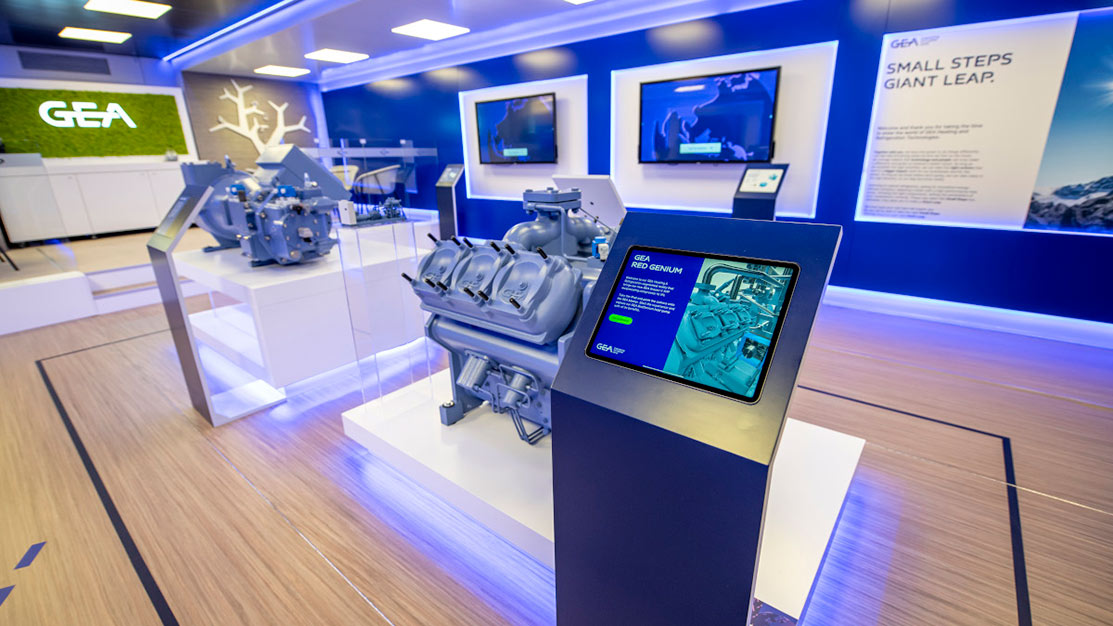
Many booths use multiple screens to create distinct experiences or showcase different departments simultaneously. If that’s your plan, test it during the trial. GEA, a global engineering company, used four touchscreens across their booth to present four unique department experiences, dramatically increasing booth traffic and engagement. Your platform should let you manage multiple screens from a single control point and track which materials were viewed on which device.
Customization and White-Label Options
If you work with agencies, partners, or resellers, you may need branded or customised versions of the software. A proper free trial should let you explore white-label customization options and understand the workflow for handing off projects to third parties. This avoids surprises later.
Offline Capability, Lead Capture, and Real-World Performance
Over twenty years, I’ve observed one pattern consistently: the software that wins isn’t always the one with the longest feature list. It’s the one that solves the specific problems your team faces at that moment. For events in 2026, three features separate winners from the rest.
Offline Performance Without Compromise
This is the most critical test. Touchscreen software designed for events must function completely offline because WiFi connectivity at venues is unpredictable and cannot be relied upon for mission-critical experiences. During your free trial, load your content, disconnect entirely from the network, and spend time using the software exactly as an attendee would. Play videos, swipe through galleries, submit lead forms, open PDFs. Every interaction should feel smooth and instant. If performance degrades offline, that’s a red flag.
Lead Capture That Drives Real Conversation
A touchscreen booth that attracts visitors but fails to capture their information is an expensive decoration. The software should make it effortless for attendees to share contact details—ideally in under 10 seconds, without friction. Test the lead form during your trial: Is it clear? Do the fields make sense? Can you send materials directly to the contact’s email immediately after they submit? The best software closes that loop instantly, creating a moment of delight (“I just sent you our product sheet”) that strengthens the relationship.
One customer at CLD Inc emphasised this point: “The ability to zoom in and show details that can’t be conveyed with a brochure is powerful. The interactive map is far more engaging than a static PDF, and sending materials directly from the booth to customers is invaluable.” That feature—sending from the booth—is a conversation starter and a competitive advantage.
Analytics and ROI Tracking
You need to know what worked. During your trial, check what analytics the platform provides. Can you see which content was viewed most? Which materials were sent? How long did each visitor spend? This data transforms the booth from a cost centre into a measurable revenue driver. Touchscreen software with ROI tracking capabilities lets you prove value to leadership and make smarter decisions about next year’s investment.
How POPcomms Supports Your Trial Experience
Not all free trials are created equal. The best ones include support from people who understand your use case and can help you test the right things. Our services are built on this principle: your trial shouldn’t be a lonely product demo, it should be a guided exploration with an experienced partner.
When you start a free trial with POPcomms, you’re not just getting software access. You’re getting collaboration with a team that has spent two decades solving problems for marketing and events professionals in industrial, healthcare, and technology sectors. We’ve built software specifically for trade shows, which means it’s architected around the real constraints you face: offline reliability, speed of content creation, and actual lead conversion—not theoretical features.
Our trial support includes help with customizing your touchscreen interface for your tradeshow setup, testing infrared touchscreen display software if that’s your hardware choice, and working through real scenarios with your team. One customer put it this way: “If you need a platform that lets you quickly create and customize interactive touchscreen content while having an experienced team to support and enhance your ideas, then POPcomms is for you.”
During your trial, you can also explore how to integrate touchscreen software with product demos, implement comparisons against other platforms, and even test optimization techniques for fast loading on your specific hardware. The goal is to make sure you’re confident before your event.
From Trial to Live Event: Making the Transition
The moment you finish your free trial and decide to move forward, the transition should be seamless. This is where choosing a partner with real support makes all the difference.
Onboarding That Doesn’t Slow You Down
Your team has already learned the software during the trial, so the onboarding phase should focus on finalising your event content, testing your specific hardware setup, and running through your booth flow. A good partner will have templates, best-practice guides, and clear checklists. You should never feel like you’re starting from scratch.
Pre-Event Testing and Validation
Before you go live, run through a full simulation of your event day. Test with the actual display hardware you’ll use, the venue’s power and network setup (even if offline), and your full team. Identify any questions or edge cases now, not during the event itself. Most issues disappear once you’ve anticipated them.
On-Site Support
The best software platforms offer support on event day—either on-site or remote. Know exactly who to contact if something goes wrong and how fast they respond. This peace of mind is worth more than almost any feature.
If you’re ready to explore how touchscreen software can transform your booth experience, contact us to discuss your specific needs and set up a guided free trial. We’ll help you test the right features with your own content and hardware, answer all your questions, and ensure you understand the real value before you commit.
Frequently Asked Questions
What’s included in a free trial of touchscreen software?
A comprehensive free trial includes full software access, sample templates, the ability to upload your own content, offline functionality testing, lead capture form configuration, and ideally, expert support to help you test real scenarios relevant to your event. No credit card should be required to start. The trial period typically lasts 7–14 days, giving you enough time to build something meaningful and test it with your team and hardware.
How do I know if touchscreen software will work at my event venue?
During your free trial, specifically test offline functionality by disconnecting completely from WiFi and verifying that all features work smoothly. Contact your venue about power availability and physical space for your display. Ask the software provider if they’ve worked with your venue type before and what specific setup they recommend. The best way to be certain is to test your exact hardware and content offline during the trial period before committing to the live event.
Can I create touchscreen content without technical skills?
Yes, modern no-code touchscreen software platforms like POPcomms are designed specifically so marketing teams can create interactive experiences without hiring developers or agencies. During your free trial, you’ll build actual content with your own assets. If your marketing team finds the platform intuitive and can complete a sample project independently, that’s a strong signal the software is right for you. Many teams report creating booth content in hours rather than weeks.
How much does touchscreen software cost after the free trial?
Pricing varies widely depending on your specific needs, hardware, and usage. The important thing is to test the software first during a free trial to confirm it delivers real value before discussing pricing. Quality providers are transparent about costs and tie their pricing to outcomes—like the number of displays, attendees, or events per year. After your trial, a good partner will explain the cost in the context of ROI: increased dwell time, lead capture, and attendee memory of your booth.
Will lead capture data integrate with my CRM?
Most modern touchscreen software platforms offer CRM integration or direct data export to CSV, allowing you to import leads into your system. During your free trial, test the lead capture form, export functionality, and ask the provider specifically about integration with your CRM (Salesforce, HubSpot, Pipedrive, etc.). The ideal scenario is two-way sync or automated data delivery, so leads flow directly into your sales system without manual work. Clarify this before committing to the platform.
A free trial removes all doubt about whether touchscreen software will actually work for your next event. Don’t make a software decision based on a demo alone.
Take the next step today.

Related Posts
Question-Led Deal Room Design Patterns: Flows, Paths, and KPIs
Read
Design Patterns for Question-Led Interactive Presentations in Buying Committees
Read
Essential Mobile Responsive Touchscreen Software Features
Read
Why Your Sales Enablement Strategy Should be Constantly Evolving
Read