




Multitouch Software for Large Format Displays
Last updated: 12 May 2026
Most exhibitors still rely on static banners and printed collateral, even though interactive displays with multitouch capability draw 35% more visitors compared to traditional setups. Your competitors are already using them. If your booth isn’t offering hands-on, self-guided exploration, you’re missing the moment when a prospect decides whether your brand is worth their time. Multitouch software for large format displays changes that equation entirely, transforming passive observers into active leads who spend 10–15 times longer engaging with your content. This article reveals exactly how multitouch technology works, why it’s essential in 2026, and which platforms deliver real results for marketing and events teams.
Key Takeaways
- Multitouch software enables simultaneous input from multiple users on large displays, turning group exploration into a shared brand experience rather than one-at-a-time interaction.
- Interactive displays increase booth dwell time by 30–40% and lead capture by up to 35% compared to traditional setups, delivering measurable ROI at trade shows and events.
- 81% of attendees remember booths featuring interactive touchscreens, and 84% feel more confident about brands that offer hands-on experiences, making multitouch displays a trust-building tool.
- Modern multitouch software works fully offline without loss of functionality, eliminating WiFi dependency and ensuring reliable performance at events where connectivity is expensive or unreliable.
What Multitouch Software Actually Does
Multitouch software allows multiple people to interact simultaneously with the same large display, each independently exploring content using touch gestures. Unlike single-touch interfaces, where one user controls one point at a time, multitouch recognizes and responds to multiple contact points across the screen surface. This means two, three, or four people can gather around a 55-inch, 75-inch, or 85-inch display and each explore different product information, zoom into details, or navigate menus at the same time.
Think about what happens at a trade show booth when three prospects approach your display. With a single-touch interface, only one can engage meaningfully. The other two wait. With multitouch capability, all three explore simultaneously, and your sales team sees higher engagement scores. According to EXHIBITOR Magazine research on interactive booth performance, this simultaneous engagement model is a primary driver of why interactive displays achieve average dwell times of 5 to 12 minutes per visitor, compared to roughly 45 seconds for passive displays.
The technology works through capacitive or infrared sensing arrays embedded in or beneath the display surface, detecting the position and movement of multiple fingers or touch points in real time. The multitouch software layer interprets those inputs and responds with smooth, intuitive gestures, pinch-to-zoom, swipe navigation, and multi-finger controls. When your content is designed specifically for this interaction model, exploration feels natural and inviting.
Modern multitouch platforms can be deployed across customized touchscreen interfaces that scale across different display sizes and venues. That flexibility matters because booth footprints, venue layouts, and audience sizes all vary. A 32-inch kiosk in a healthcare corridor performs a different job than a 75-inch wall-mounted display in a main exhibition hall, yet both benefit from multitouch capability to maximize engagement.
Why Large Format Displays Need Multitouch Capability
Large format displays without multitouch support are essentially very expensive single-user tools. A 75-inch or 85-inch screen draws visual attention, but if only one person can interact at a time, you’ve created a bottleneck. At a busy trade show, that bottleneck kills momentum. Prospects move past because they can’t immediately engage, or they wait for the current user to finish, which erodes patience and reduces lead quality.
Multitouch capability on large displays fundamentally changes how groups behave around your booth. When three decision-makers can stand in front of a 75-inch display and each explore product specifications, customer testimonials, or application videos independently, the booth becomes a gathering point. Conversation flows naturally. Questions surface. And your team has 5–12 minutes of meaningful interaction instead of a rushed 45-second exchange.
The statistics underscore this: 68% of trade show attendees believe booths featuring innovative technology have limitless potential, signalling that visitors actively expect and reward tech-driven experiences. But it’s not just about novelty. Interactive displays that allow self-guided exploration are fundamentally different from vendor-led pitches. Attendees retain control. They drill into topics that matter to them. No sales pressure, just discovery at their own pace. This sense of autonomy transforms the booth dynamic and builds trust.
Large format displays also create a more inclusive experience. When content is presented on a small laptop or printed collateral, one person reads while others look over their shoulder. When the same content appears on a 75-inch multitouch display, everyone sees it clearly, and everyone can contribute to the exploration. That inclusivity matters in B2B settings where decisions often involve teams rather than individuals.
Key Features That Drive Engagement
Not all multitouch software is equal. The platforms that actually drive engagement and lead capture share certain core features. Understanding them helps you evaluate whether a solution is fit for your booth, event, or venue.
Intuitive Gesture Recognition
The software must recognize common touch gestures instantly and respond fluidly. Pinch-to-zoom, swipe navigation, two-finger rotate, and long-press actions should feel natural to users who’ve grown up with smartphones and tablets. If the interface lags or requires learning a special interaction language, users abandon it within seconds. The best multitouch platforms feel invisible, meaning users focus on the content, not the mechanics.
Rich Media Integration
Modern multitouch displays need to handle video, high-resolution images, PDFs, product catalogs, and interactive maps without stuttering or lag. CLD Inc, a client who deployed multitouch experiences for trade shows, found that the ability to integrate videos and interviews was transformative: “We wanted a modern, engaging solution for trade shows, something that would work offline, include touchscreens, and offer user-friendly navigation. POPcomms gave us an eye-catching digital tool to showcase our products with videos and interviews.” Their team could layer rich content without needing specialized programming skills.
Lead Capture Without Friction
A multitouch display that draws visitors but doesn’t capture contact information is a missed opportunity. The best platforms allow users to share materials directly from the booth, request follow-ups, or input contact details with minimal friction. One client noted: “The ability to zoom in and show details that can’t be conveyed with a brochure. The interactive map is far more engaging than a static PDF, and sending materials directly from the booth to customers is invaluable.” That send-to-email feature transforms a engagement moment into a tracked lead.
No-Code Customization
Before solutions like POPcomms emerged, creating multitouch experiences required hiring developers and waiting months for builds. That barrier meant interactive displays were reserved for companies with large budgets. Modern software solutions now provide no-code platforms where marketing teams can design and deploy multitouch experiences in days, not months. You don’t need programming knowledge. You can update content the week before an event. That agility is essential in 2026 when campaign requirements shift quickly.
Offline Performance and Event Reliability
WiFi at trade shows and large events is notoriously expensive, unreliable, and slow. If your multitouch software depends on cloud connectivity or constant internet access, you’re building a house on sand. Professional multitouch software for events must be installed directly on the display hardware and function flawlessly offline without any loss of functionality.
This is non-negotiable. Your booth is running a presentation to 200 visitors across six hours. WiFi drops at hour three. With cloud-dependent software, your display goes dark. With true offline-capable multitouch software, the experience continues uninterrupted. Users can still zoom, swipe, capture leads, and explore without any degradation in performance.
The offline requirement also addresses security and performance optimization. All content is loaded locally on the device. No latency waiting for servers to respond. No data streaming over WiFi consuming bandwidth. The multitouch experience runs at full speed regardless of network conditions.
Real Results: Lead Capture and Dwell Time
The metrics are compelling. Booths with interactive touchscreen displays achieve average dwell times of 5 to 12 minutes per visitor compared to roughly 45 seconds for passive displays. That’s a 10–15x increase in the window your sales team has to start a meaningful conversation. The Freeman Trends Report on trade show engagement puts the engagement lift from interactive technology overall at a 3–5x factor, but multitouch capabilities push results even higher because simultaneous multi-user interaction removes the waiting-in-line dynamic.
Beyond dwell time, the lead quality matters. 81% of attendees remember booths that feature interactive touchscreens, and 84% feel more confident about brands that offer hands-on experiences. Those aren’t vanity metrics. Memory and confidence directly correlate with post-event follow-up, conversion rates, and deal velocity. When a prospect remembers your booth fondly and feels positive about your brand, they’re far more likely to respond to your outreach email after the show.
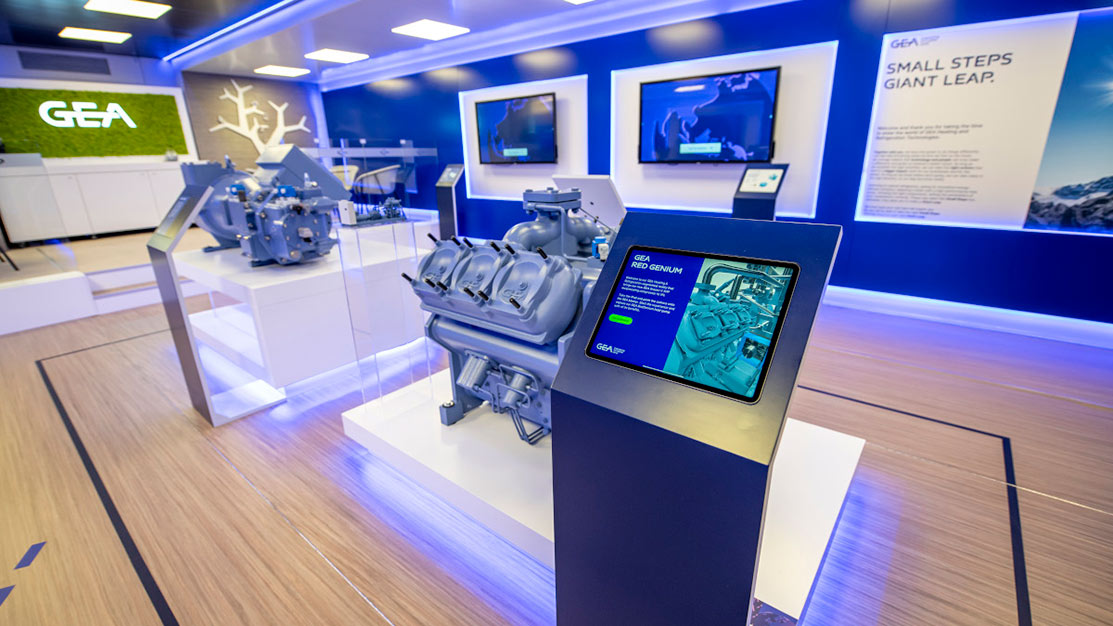
Lead capture rates also jump. Interactive displays can increase lead capture by up to 35% compared to traditional setups, partly because the hands-on exploration builds engagement, and partly because modern multitouch platforms make it frictionless to share contact details directly from the booth. GEA reported: “With four touchscreens, we could present four unique experiences across departments, which brought a lot of traffic and engagement to our booth. Tracking what materials were sent and opened afterward has been very useful for us.” They were able to tie booth engagement directly to post-event follow-up metrics.
Choosing the Right Software for Your Needs
Multitouch software options range from expensive, developer-dependent custom builds to modern no-code platforms. Your choice depends on your timeline, budget, technical expertise, and event complexity.
Define Your Event Context
Are you deploying multitouch displays at a single annual trade show, a roadshow visiting 12 cities, or permanently in a corporate lobby or customer experience center? Single-event deployments allow you to prioritize ease of setup and plug-and-play functionality. Multi-venue roadshows need portability and quick redeployment. Permanent installations can justify more sophisticated software with deeper analytics and customization.
Evaluate Content Complexity
What will visitors actually interact with? Simple product galleries, videos, and contact forms can be deployed quickly on most platforms. Complex interactive maps, real-time data visualization, or integration with external systems require more capable software. Consider whether you need touchscreen software that integrates with product demos or live capabilities. That scope directly affects platform selection.
Assess Your Team’s Capacity
If your marketing team includes designers and content creators but no developers, you need no-code software where non-technical team members can customize and update experiences independently. If you have a dedicated tech team, you might tolerate more complex setup in exchange for deeper customization. Honest assessment here prevents you from buying software that requires capabilities you don’t have.
When evaluating platforms, ask directly whether they support true offline performance, whether multitouch gestures feel natural and responsive, and whether lead capture is built-in and frictionless. Request demos where multiple people simultaneously interact with the display. That hands-on trial reveals whether the software delivers the engagement promise. Contact us to discuss your specific requirements and see how a platform handles your use case.
One final consideration: Professional multitouch software should require no special training or coding skills from your team. One client emphasized: “We needed a solution that was truly user-friendly, something that anyone on our team could pick up and use without needing coding experience or specialized training. Simplicity and accessibility were absolutely key for us.” That requirement filters out overcomplicated tools quickly. The best platforms disappear into the background, letting your content and visitor interaction be the focus.
Frequently Asked Questions
What’s the difference between multitouch and single-touch display software?
Single-touch software recognizes one contact point at a time, meaning only one person can interact meaningfully. Multitouch software detects multiple simultaneous contact points, allowing 2–4 people to explore content independently on the same large display. This eliminates waiting and enables shared group exploration, which is why multitouch displays achieve 10–15x longer dwell times at trade shows.
How quickly can we deploy multitouch software at our next event?
Modern no-code multitouch platforms like POPcomms allow deployment in days, not months. You can design layouts, upload content, and test on actual hardware within 1–2 weeks, even without technical expertise. Earlier approaches requiring custom development took 3–4 months and significant cost. This speed matters when you’re planning trade shows with tight event timelines.
Does multitouch software work without WiFi or internet?
Yes, professional multitouch software for events is installed directly on the display hardware and runs completely offline without any loss of functionality. All content is loaded locally, eliminating dependency on venue WiFi, which is often unreliable or expensive. This is essential for reliable performance across 6–8 hour booth days at crowded trade shows where network connectivity is unstable.
Which large display sizes work best with multitouch software?
Multitouch works effectively on displays ranging from 32 inches to 85 inches. Smaller 32–43 inch displays suit kiosk-style single-user or small-group scenarios. Mid-size 55–65 inch displays work well for 2–3 simultaneous users. Larger 75–85 inch displays support 4+ concurrent users and create more dramatic booth focal points. Your choice depends on booth footprint, visitor flow, and how many people you expect simultaneously.
Can multitouch displays capture and track leads automatically?
Yes, professional multitouch software includes built-in lead capture with email sending, contact form collection, and material sharing directly from the booth. Users can request PDFs, brochures, or demo videos, which get delivered to their inbox, and your team receives a list of who requested what. Touchscreen software with lead capture tools often includes analytics showing which materials were requested and which were opened post-event, connecting booth engagement to downstream follow-up outcomes.
Building an interactive booth experience takes time and technical skills you may not have on staff, and missed opportunities at trade shows are impossible to recover once the event ends.
Take the next step today.

Related Posts
5 Ways to Create Persuasive Presentations | POPcomms
Read
Design Patterns for Question-Led Interactive Presentations in B2B Meetings
Read
3D Modelling Made Easy | POPcomms
Read
Bringing Scotland’s Moving Image Archive to Life Through an Interactive Touchscreen Experience
Read